Every day we at Smart Generation try to offer you the best browsing and shopping experience by making our website ever simpler, more intuitive and faster.
That is why we keep implementing new features and functions and from today also a new “smart search bar”.
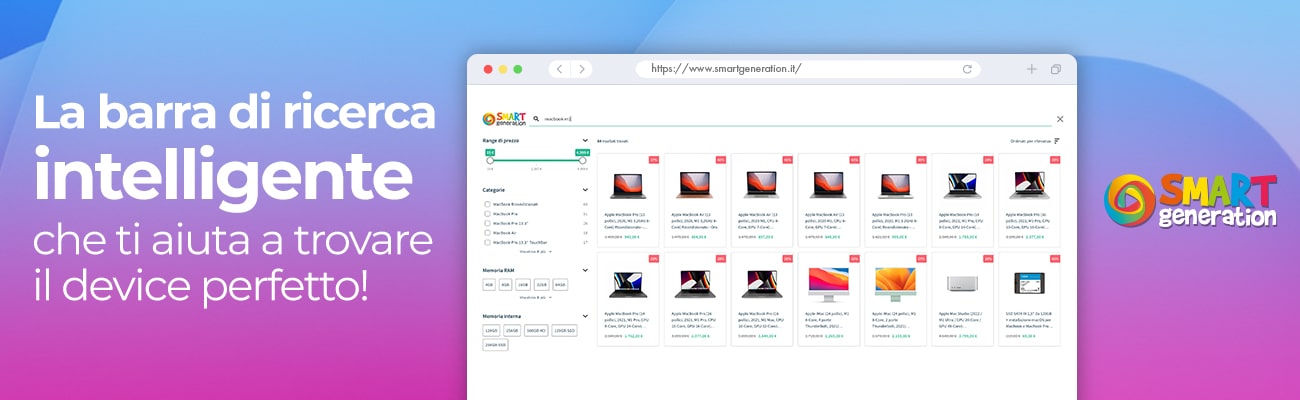
Thanks to this new feature, once on our website, you can filter your searches by entering in the search bar the keywords that best suit the product you are looking for, and the “smart” system will help you quickly find what you are looking for, saving you a lot of time.
A few examples?
Typing “iMac 2017” will show only the devices released in that year, searching for the keywords “iPhone Pro” you will find only the PRO versions of the various iPhone models, and the same will happen if you type, for example, “MacBook Air”, with the Air versions of the various Macbook models appearing.
Consoles follow the same logic too: try typing “PlayStation Slim” and you will see only the Slim versions of the famous console appear. This also happens if you want to filter the search by color, for example by entering “iPhone red”, which gives you only the models in this color and related products.
Looking for a MacBook with an Italian keyboard? Just search for “MacBook” in the search bar, filter by choosing “Italian” among the keyboard layouts, and all the devices in stock with an Italian keyboard will appear immediately.
Finally, beside the search results, you can further filter your searches by “price range”, “categories”, “storage”, “color” and “cosmetic condition”. So whether it is functional features, colors, models or specific versions of a device, just ask our “smart search bar” and it will find what you were looking for.
Start your search now, with Smart Generation: seek…and you shall find!
Search: